

الشرح :
نقوم بفتح قالب post_macros ونبحث عن هذا الكود :
نقوم باستبدالة بهذا الكود :
ثم نفتح قالب extra.less ونضع هذا كود في اسفله :
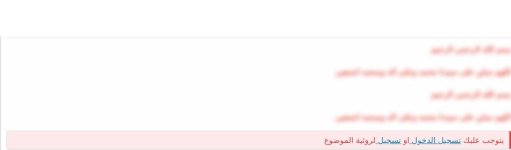
النتيجة :
انتهى ..
نقوم بفتح قالب post_macros ونبحث عن هذا الكود :
كود:
{{ bb_code($post.message, 'post', $post) }}
كود:
<div class="{{ (!$xf.visitor.user_id && $post.isFirstPost()) ? 'blur-message-content' : '' }}">
                {{ bb_code($post.message, 'post', $post) }}
            </div>

            <xf:if is="!$xf.visitor.user_id && $post.isFirstPost()">
                <div class="block blockMessage blockMessage--error blockVisitor">
                    يتوجب عليك
                    <a href="{{ link('login') }}" class=""
                            data-xf-click="overlay" data-follow-redirects="on">
                            <span class="p-navgroup-linkText">{{ phrase('log_in') }}</span>
                        </a>
                    او
                    <a href="{{ link('register') }}" class=""
                                data-xf-click="overlay" data-follow-redirects="on">
                                <span class="p-navgroup-linkText">{{ phrase('register') }}</span>
                            </a>

                    لروئية الموضوع
                </div>
            </xf:if>
ثم نفتح قالب extra.less ونضع هذا كود في اسفله :
كود:
.blur-message-content {
    -webkit-filter: blur(4px);
    -moz-filter: blur(4px);
    -ms-filter: blur(4px);
    -o-filter: blur(4px);
    filter: blur(4px);
    filter: progid:DXImageTransform.Microsoft.Blur(PixelRadius='2');
    pointer-events: none;
    -webkit-user-select: none;
    -moz-user-select: none;
    -ms-user-select: none;
    -o-user-select: none;
    user-select: none;
}

.blockVisitor{
    margin-top: 1rem !important;
    a{
        color: @xf-linkColor !important;
    }
}
النتيجة :
انتهى ..
