

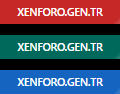
طريقة التركيب :
ضع في قالب extra.less
CSS:
.xengentrBanner {
    display: inline-block;
    text-align: center;
    font-size: .7em;
    font-weight: 500;
    color: #fff;
    text-transform: uppercase;
    padding: .5em 0em;
    width: 100%;
    border: none;
    position: relative;
    overflow: hidden;
    &.admin {
        background: #c62828;
    }
    &.moder {
        background: #00695C;
    }
    &.user {
        background: #1565C0;
    }
    &:before {
        content: "";
        position: absolute;
        background: linear-gradient(135deg, transparent 0%, transparent 30%, rgba(250, 250, 250, .7) 50%, transparent 70%, transparent 100%);
        background-repeat: no-repeat;
        top: 0px;
        left: -80%;
        width: 100%;
        height: 100%;
        animation: light 2.5s infinite;
    }
    .tooltip-content & {
        .tooltip--member & {
            width: 120px!important;
        }
    }
    @media (max-width: @xf-responsiveMedium) {
        display: inline!important;
        padding: .5em 1em;
    }
}
@keyframes light {
    0% {
        left: -80%;
    }
    100% {
        left: 80%;
    }
}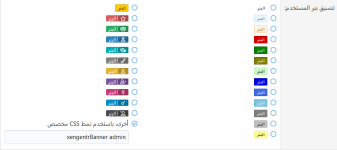
CSS:
For Admin:
xengentrBanner admin
For Moderator:
xengentrBanner moder
For Normal Members
xengentrBanner user